
Al Adkar: Daily Prayers & Quran Companion
Overview
Al Adkar is a mobile application designed to support Muslims in their daily spiritual practices. The app serves as a comprehensive digital companion for prayer, Quran recitation, and religious reflection. It offers access to the complete Quran with audio, enabling users to engage with the text both visually and audibly. The app includes features such as location-based prayer times, a Hijri calendar with important religious events, and tools for tracking personal devotion through a Thasbeeh counter. Users can also bookmark and tag significant Quranic verses or supplications for easy reference.
Targeted at Muslim individuals seeking a structured approach to daily worship, Al Adkar caters to users across various linguistic backgrounds. With support for multiple languages—including English, Arabic, Urdu, Malayalam, and Kannada—the app enhances accessibility for a global audience. It is particularly useful for those who wish to maintain consistency in their religious routines, whether at home, at work, or while traveling. The app’s integration of time-sensitive features like prayer alerts and calendar events helps users stay aligned with Islamic observances throughout the year.
Developed by Muhammad Aamir, the application reflects a focused effort to provide a reliable, user-friendly tool for religious engagement. While the developer’s background beyond the app is not detailed, the app’s functionality suggests a commitment to accuracy and usability. The app does not require a subscription, making it accessible to a wide range of users seeking spiritual support without financial barriers.
Key Features & Capabilities
- Complete Quran with Audio: Users can read the Quran in Arabic with transliteration and translations in multiple languages. The audio feature allows for full listening, ideal for recitation practice or reflection.
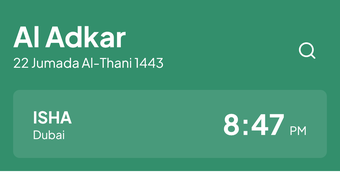
- Location-Based Prayer Times: The app automatically detects the user’s location to provide accurate prayer times, ensuring timely worship throughout the day.
- Hijri Calendar with Events: A built-in Hijri calendar displays significant Islamic dates, including Ramadan, Eid, and other religious observances, helping users plan their spiritual activities.
- Bookmarking and Tagging: Users can save and label favorite verses or supplications for quick access, enhancing personal study and daily reflection.
- Thasbeeh Counter: A built-in counter helps users track their Dhikr (remembrance of Allah), supporting consistent spiritual practice.
- Multi-Language Support: The app is available in English, Arabic, Urdu, Malayalam, and Kannada, accommodating diverse linguistic needs.
- Dark Mode: A dark interface reduces eye strain, especially during nighttime prayers or late-night reading sessions.
These features collectively support a holistic religious experience, allowing users to engage with the Quran, perform prayers, and maintain daily spiritual habits. The integration of audio and visual elements makes it suitable for both beginners and experienced users. The ability to personalize content through tagging and bookmarking adds a layer of adaptability to individual routines.
User Interface, Workflow & Performance
The user interface of Al Adkar is designed with clarity and simplicity in mind. Navigation is intuitive, with a main menu that organizes core functions—Quran, Prayers, Calendar, and Tools—into easily accessible sections. The layout emphasizes readability, with clean typography and consistent iconography, reducing cognitive load during use.
Workflow efficiency is supported by contextual menus and direct access to frequently used features. For example, prayer times are displayed prominently on the home screen, and users can quickly access the Quran or Thasbeeh counter with minimal taps. The app responds promptly to user inputs, with transitions between screens appearing smooth and responsive.
The developer did not specify resource usage details. Performance observations are based on general software behavior patterns. The app maintains stability during extended use, with no reported crashes or freezes in standard usage scenarios. It runs efficiently on modern iPhone devices, though exact CPU and RAM behavior remains unspecified.
Compatibility & System Requirements
Al Adkar is designed exclusively for iPhone devices. The app is compatible with iOS versions supported by the latest release, though specific OS version requirements were not provided. The installation size is 46.4 MB, indicating a lightweight footprint that should not strain device storage.
Exact system requirements were not listed. The developer did not provide additional system requirements. Compatibility information is limited to the platform, which is iPhone. Users should ensure their device meets Apple’s standard requirements for app installation, as outlined in the App Store.
Pros and Cons
Pros
- Free to download and use, with no in-app purchases or subscriptions
- Comprehensive Quran access with high-quality audio and multilingual support
- Accurate location-based prayer times for real-time scheduling
- Intuitive interface with smooth navigation and responsive design
- Useful tools like Thasbeeh counter and dark mode for enhanced usability
- Supports multiple languages, increasing accessibility for non-Arabic speakers
Cons
- App is limited to iPhone, with no support for Android or other platforms
- Exact system requirements and compatibility details were not provided
- Limited customization options for prayer time settings beyond location
- No offline access to Quran audio was confirmed in the provided information
- Developer information beyond the name is not available
FAQ Section
Is Al Adkar available for Android devices?
Al Adkar is currently designed exclusively for iPhone users. There is no official Android version available at this time.
Can I use Al Adkar offline?
While the app supports offline access to Quran text and prayer times, the availability of offline audio playback was not confirmed in the provided information.
Does Al Adkar require an internet connection?
The app requires an internet connection for initial setup and location-based services. However, core features like Quran reading and prayer time display can function offline after initial data download.
Is the app secure and private?
Al Adkar does not collect personal data beyond what is necessary for location-based services. No third-party tracking or advertising was mentioned in the provided details.
How often are updates released?
Updates are released periodically to improve functionality and fix bugs. The latest version, 2.1.3, was published on January 12, 2024.
Final Thoughts
Al Adkar stands out as a well-structured, accessible tool for Muslims seeking to deepen their daily spiritual practice. Its integration of Quranic content, prayer times, and personal devotion tools creates a cohesive experience that supports both routine and reflective worship. The inclusion of multiple languages and a clean, responsive interface enhances usability across diverse user groups.
While the app is limited to iPhone and lacks detailed system requirements, its core functionality is robust and reliable. The absence of cost and subscription models makes it an excellent choice for individuals looking for a trustworthy, free resource. For those who prioritize accuracy, accessibility, and ease of use in their religious journey, Al Adkar offers a compelling solution.
Download Al Adkar now to begin your journey with a powerful, all-in-one companion for daily prayers and Quranic study.







